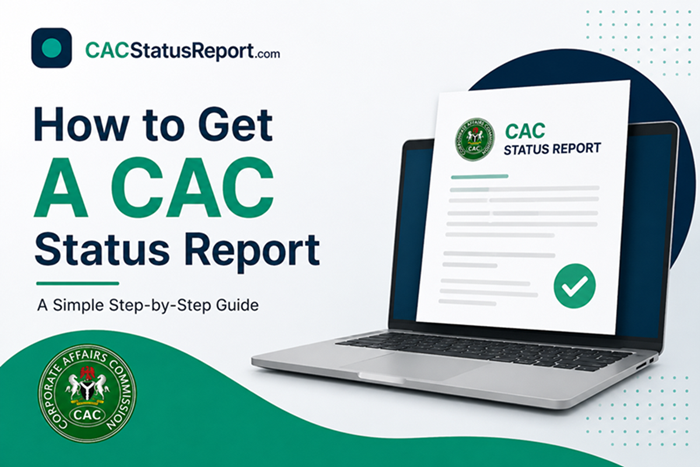
How to Get CAC Status Report
Whether you’re applying for a business loan, opening a corporate bank account, or verifying a company before signing a contract, you’ll often be asked to provide a CAC status report. It’s one of the most requested documents for proving that a business is legally registered and active with the Corporate Affairs Commission.
The good news is that getting your C.A.C status report doesn’t have to be complicated or time-consuming. In fact, you can get one within 10-30 minutes.
In this guide, we’ll walk you through exactly how to get CAC status report, whether you choose to do it yourself online through the CAC portal or go through an accredited agent, along with what it costs, how long it takes, and how to avoid the common mistakes that slow the process down.
What You Need Before Requesting a CAC Status Report
To get a CAC status report for any entity in Nigeria, you need to provide either the entity number, exact name of the entity or both.
For business names (BN……), the entity must be active on the CAC portal. That is, the entity’s annual return must have been filed and up to date. This requirement is not mandatory for companies and incorporated trustees.
Unlike business names, companies (LTD, PLC) and incorporated trustees (IT) can still obtain a status report even if their annual returns are not fully up to date, since these entity types are treated differently under the CAC’s compliance rules.
However, it’s worth noting that having outstanding annual returns may still appear as a compliance issue on the report itself, so it’s advisable to regularize your annual filings before requesting a status report to ensure the document reflects your entity in good standing.
How to Get CAC Status Report for an Entity You Own
There are two ways to get a status report for an entity you own; it’s either you get it through the CAC portal by yourself or through an accredited agency.
Now, to get it through the CAC portal by yourself, you must have access to the CAC account used in registering the business.
If you have access, follow the steps below to get the status report for your business;
Step 1: Login to the CAC account
Visit the CAC portal, select email and log in with your email address and password.
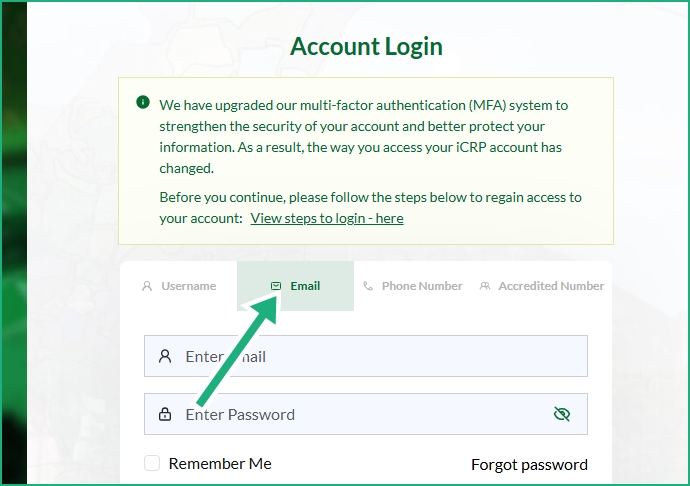
If you registered the business before 2025, you might need to set up a two factor authentication on your CAC account.
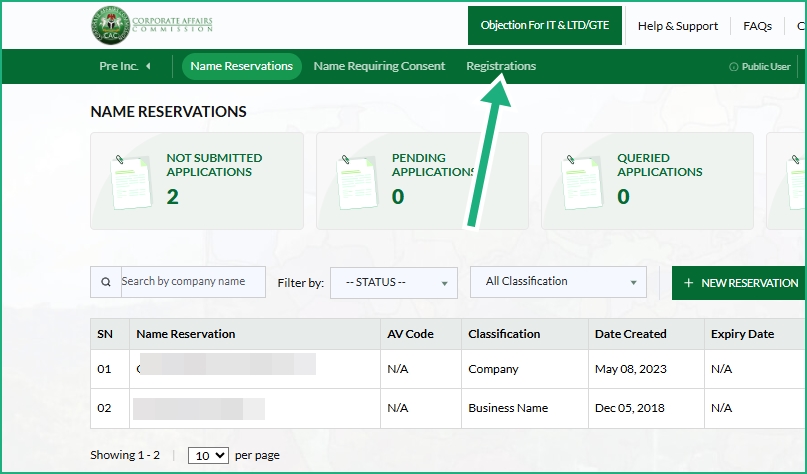
Step 2: Go to the Registrations Tab
The registrations tab is where you will find all the entities you have registered on the CAC account you are logged in to. See the image below.
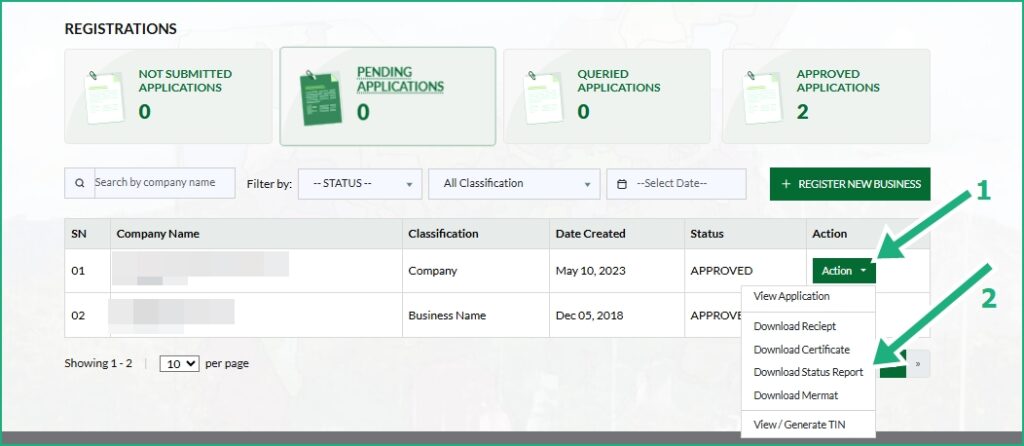
Step 3: Download the Status Report
Find the entity you need and click on actions. From the list of options, select “status report”. The status report will be downloaded to your device.
How to Get CAC Status Report as a Third Party
If you want to obtain the CAC Status Report of a company, business name, or incorporated trustee that you do not own, you have to apply through an accredited CAC agent, following the steps below:
1. Send us a message on WhatsApp. If you prefer to communicate via email, send us a message through our Contact Us page.
2. Provide the CAC registration number and the name of the entity you need a status report for.
3. We will verify that the entity exists in the CAC database and confirm that a Status Report can be obtained for it, then provide you with our account details for payment. If you are in Nigeria, the fee is ₦12,000. International customers will pay US$15.
4. Once we validate your payment, we will begin processing your request. Your CAC status report will be ready within 30 minutes after your payment has been confirmed.
Common Errors When Requesting a CAC Status Report (and How to Fix Them)
The entity is inactive, how do I make it active?
If an entity is inactive, it usually means the owner(s) have not filed their annual returns with the Corporate Affairs Commission (CAC). To restore the entity to active status, file all outstanding annual returns if the entity belongs to you. If the entity does not belong to you, contact the owner(s) and advise them to file the outstanding annual returns. Once the filings have been processed by the CAC, the entity’s status will generally be updated.
Why is some information missing?
Some years ago, CAC registrations were carried out manually (offline). During registration, the applicants or promoters were given paper forms to complete. In many cases, certain fields were left blank, yet the registrations were still processed successfully. As a result, some older entities may have incomplete information in the CAC database.
Another reason why some fields on the status report may be blank is that the entity has not updated its records with the CAC for many years. Over time, the Corporate Affairs Commission has introduced new compliance requirements and additional information fields. For example, companies are now required to provide information on Persons with Significant Control (PSC).
Older companies that have not filed recent annual returns or updated their records may not have this information on file, so those fields will remain blank until the required updates are submitted to the CAC.
My Entity Was not found, what could be the reason?
There are a few reasons why your entity was not found:
- The entity was registered less than five days ago. Newly registered entities may take a few days before they appear in the Corporate Affairs Commission (CAC) database. If this is the case, wait for about five days and try again.
- You did not enter the correct name of the entity. For example, GoalGetterz NIG LTD is different from GoalGetterz Nigeria Limited. Enter the exact name of the entity as it appears on the CAC Certificate or other CAC registration documents and try again.
- There may be a temporary issue with the CAC portal. Occasionally, the CAC database may experience delays or technical glitches that affect search results. In such cases, search using the CAC registration number instead of the business name, or try again later.
- The entity’s records may not have been fully digitized. Some older entities that were registered before the CAC digitized its records may not be immediately searchable online. In such cases, additional verification or a manual search may be required.
The entity may have been dissolved, struck off, or otherwise removed from the register. If this has happened, the entity may no longer appear in standard searches or may require further verification with the CAC.
If you still cannot find the entity after trying the above steps, contact us or send us a message on WhatsApp with the entity’s name and, if available, its CAC registration number. We’ll verify its status and let you know whether a CAC Status Report can be obtained.